

Coordinate System Conversion
This article introduces coordinate system conversion in JS API, which includes the following content:
- Conversion between map container coordinates and latitude/longitude
- Conversion between latitude/longitude and map plane coordinates
1、Conversion between map container coordinates and latitude/longitude
Geographic locations in the real world are described using latitude and longitude, but when the map is abstracted into the browser's page, the actual location needs to be converted to the map container's pixel coordinates, and vice versa. The relationship between container coordinates and latitude and longitude coordinates is shown in the following diagram:
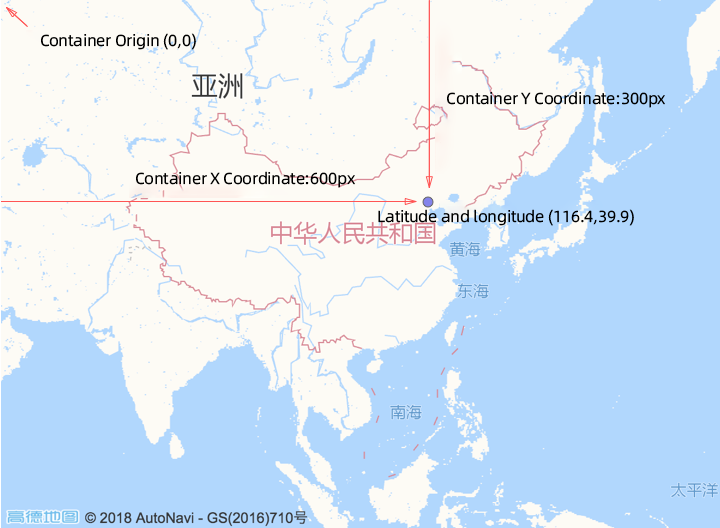
Using the two interfaces on the Map object below, you can convert between container coordinates and latitude and longitude coordinates, which is commonly used when clicking to mark geographic locations:
1.1 Convert container coordinates to latitude and longitude coordinates
//Create a map within the #container container element in HTML
var map = new AMap.Map('container', {
  zoom: 4,
});

//Container coordinates, with the origin at the top-left corner
var px = 600;
var py = 300;

//Pass in after constructing the AMap.Pixel object
var pixel = new AMap.Pixel(px, py);

//Obtain the AMap.LngLat object
var lnglat= map.containerToLngLat(pixel);
//console.log(lnglat.lng, lnglat.lat) //Which are the map latitude and longitude coordinates corresponding to the #container pixel coordinates
1.2 Convert latitude and longitude coordinates to container coordinates
//Create a map in the #container container element in HTML
var map = new AMap.Map('container', {
  zoom: 4
});

//Geographic coordinates to be converted
var longitude = 116.4;
var latitude = 39.9;

//Pass in after constructing into AMap.LngLat object
var lnglat = new AMap.LngLat(longitude, latitude);

//Obtain the AMap.Pixel object
var pixel = map.lngLatToContainer(lnglat);
//console.log(pixel.x, pixel.y) //That is the pixel coordinates corresponding to the latitude and longitude on #container
2、The interchange between latitude and longitude and planar map pixel coordinates
The JS API also provides an interface for converting latitude and longitude projections to planar map pixel coordinates.
The JS API uses Mercator projection to project spherical coordinates onto a planar coordinate system. The projected planar coordinates differ at different zoom levels, with the relationship being that for every doubling of the zoom level, the planar coordinates double in size.
For specific conversion relationships, please refer to the following diagram:
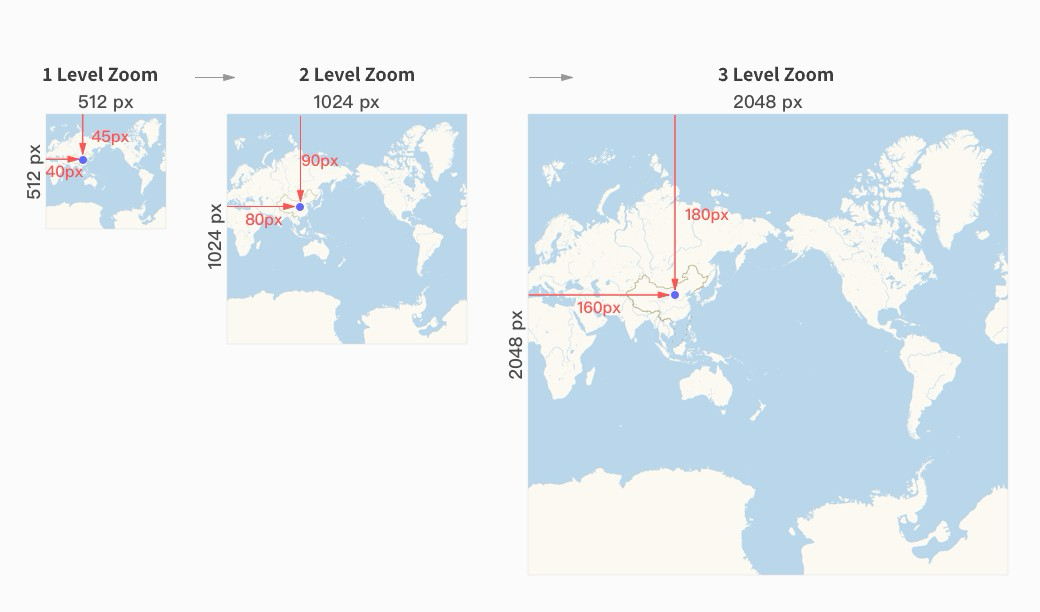
The two methods used here require the second parameter of the interface to specify the zoom level to be converted.
2.1 Convert latitude and longitude to planar map pixel coordinates
//Create the map in the #container element of HTML
var map = new AMap.Map('container', {
  zoom: 4,
});

var longitude = 116.4;
var latitude = 39.9;

//Pass in array format, the second parameter specifies the zoom level
var pixel1 = map.lnglatToPixel([longitude, latitude], 3); //Return the Pixel object

//Construct as a LngLat object and pass it in, the second parameter specifies the zoom level
var pixel2 = map.lnglatToPixel(new AMap.LngLat(longitude, latitude), 3); //Return the Pixel object
2.2 Convert flat map pixel coordinates to latitude and longitude
//Create the map in the #container element of html
var map = new AMap.Map('container', {
  zoom: 4,
});

var x = 420;
var y = 195;

//Construct as a Pixel object and pass it in, the second parameter specifies the zoom level
var lnglat = map.pixelToLngLat(new AMap.Pixel(x, y), 3); //Return the LngLat object