

Bezier Curve
This article explains how to draw Bezier curves on a map and set properties such as width, stroke color, and line style.
Arc drawing example
1、Draw a Bezier curve
1
1.1 Create Map
const map = new AMap.Map("container", {
  zoom: 14,
  center: [100.491422, 13.749313],
  showOversea: true, //Enable world Map
  mapStyle: "amap://styles/whitesmoke",
  viewMode: "2D",
});2
1.2 Create Path
//2D Array of Start Points, Waypoints, and Control Points for Bezier Curve
var startPoint = [[100.469964, 13.771655]]; //Start Point
var viaPoint1 = [
  //Linear Bezier Curve
  [100.468763, 13.763819], //Control Point
  [100.473483, 13.763903], //Waypoint
];
var viaPoint2 = [
  //Quadratic Bezier Curve
  [100.473312, 13.751897], //Control Point 1
  [100.476058, 13.752064], //Control Point 2
  [100.476058, 13.748729], //Waypoint
];
var endPoint = [
  //Linear Bezier Curve
  [100.479663, 13.734389], //Control Point
  [100.4861, 13.734139], //Waypoint
];
//Curve path configuration
var path = [
  startPoint,
  viaPoint1,
  viaPoint2,
  endPoint
];
Note
The rules for the two-dimensional array describing the Bezier curve path are as follows: the first element is the starting point, and the subsequent elements describe both control points and passing points. Each element can have 0 to 2 control points, with the control points first and the passing points last. As shown in the figure:
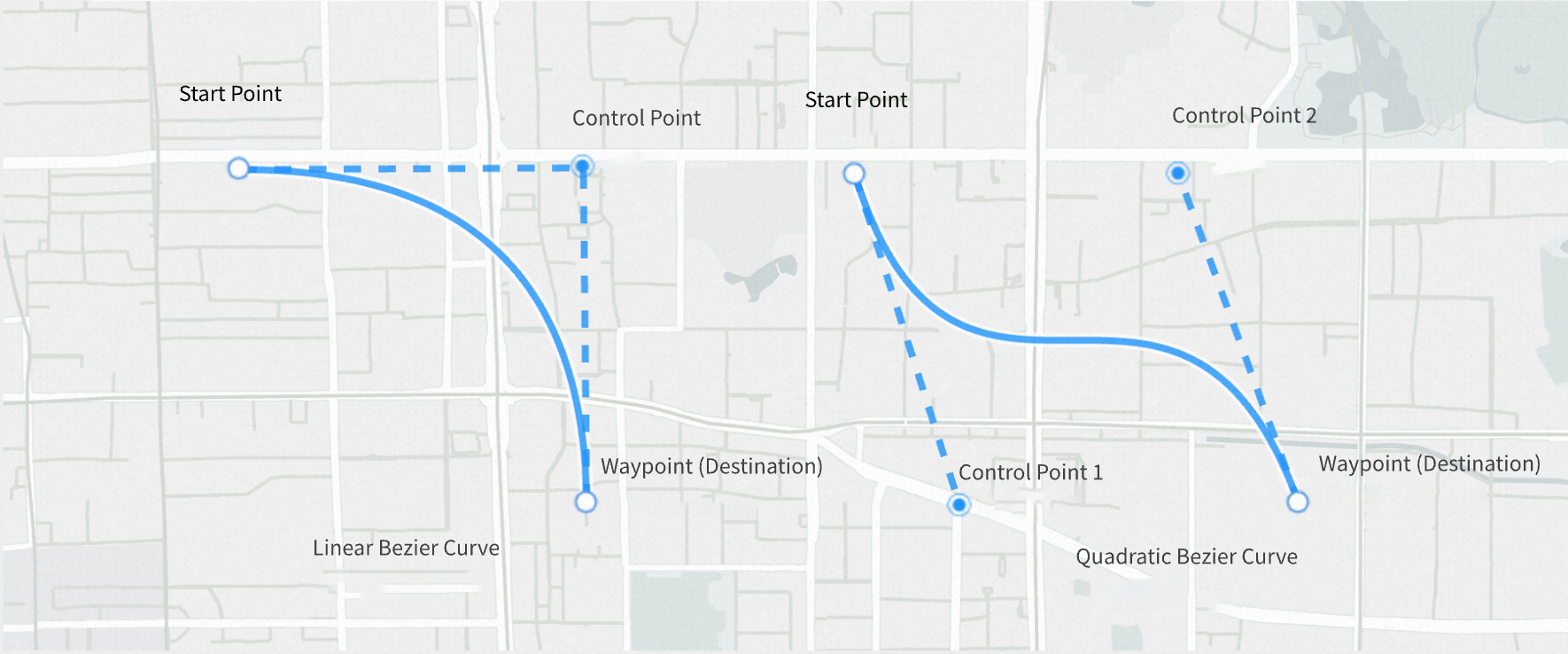
3
1.3 Create a Bezier curve instance
var bezierCurve = new AMap.BezierCurve({
  path: path,
  strokeWeight: 5,
  strokeColor: "#fff",
  isOutline: true,
  outlineColor: "red",
  borderWeight: 3,
});
Prompt
AMap.BezierCurve supports drawing of quadratic and cubic Bezier curves.
4
1.4 Add Bezier curve to map instance
map.add(bezierCurve);