

Map Composition and Common Terms
This chapter introduces the components, common terms, and some basic knowledge of JS API maps, such as latitude and longitude, levels, and map plane coordinates.
Map Composition Structure
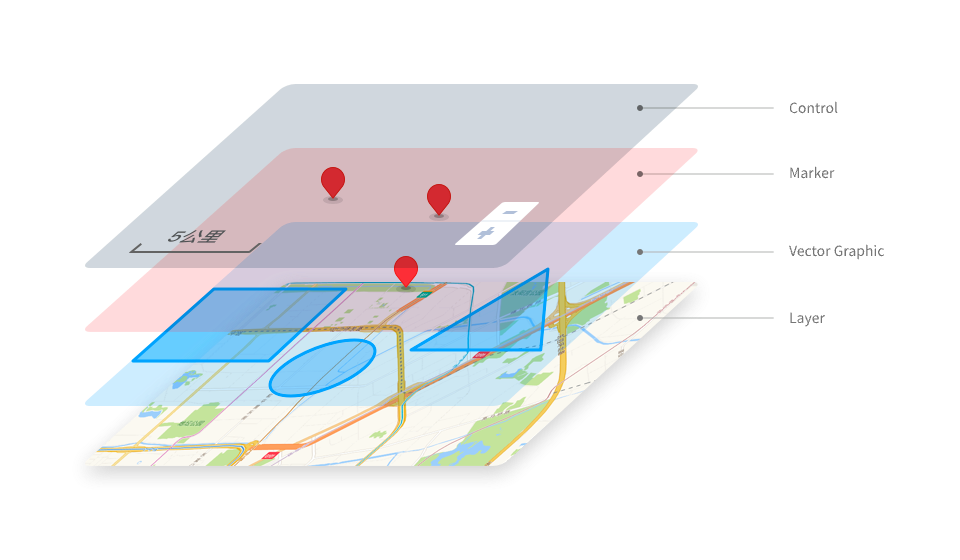
Maps created using the Gaode Map JS API usually consist of the following parts:
Map Container
This refers to the <div> object with a specified id created during the preparation phase. This <div> will serve as the container for all layers, point markers, vector graphics, and controls.
Layers
A layer is an abstract concept that can visually cover a certain map range and is used to describe map elements within all or part of a real-world region. A map usually consists of one or more layers. As shown in the figure, the two-dimensional vector layer and real-time traffic layer at the bottom of the entire map container.
The AMap JS API not only provides interfaces for official standard layers such as standard layers, satellite layers, road network layers, and traffic condition layers, but also offers interfaces for loading standard map services published by other vendors. Additionally, it provides interfaces for loading developers' own images, Canvas, videos, and heatmap data. It also deeply opens up custom layer interfaces that allow for custom drawing methods.
Vector Overlays
Vector graphics, generally overlaying the base map layer, describe their shape through vector methods (path or actual size), using geometric methods to display real map elements. They change in visual size with map zoom, but the actual path or range they represent remains unchanged, as shown by the polylines, circles, and polygons in the red box in the above image.
In addition to the polylines, circles, and polygons in the figure, the JS API also provides commonly used vector graphics such as rectangles, ellipses, and Bézier curves. The facades in 3D views can be regarded as some special vector graphics.
Markers
Point markers are used to indicate the information of a specific location as a map element, overlaying the layer. As shown by the two point elements in the blue box in the image, their position on the screen changes with map zoom and center changes, but remains relatively stationary with the elements within the layer.
Ordinary point markers (i.e., Marker) support custom icons and DOM elements as display content. In addition to Marker, to meet different scenarios, the JS API provides a variety of point marker types, such as CircleMarker, Text, and ElasticMarker. We also offer MassMarks and MarkerCluster to meet the display needs of a large number of point markers.
Map Controls
Controls float above all layers and map elements to meet certain interaction or hint functions. They are generally stationary relative to the map container and do not change position with map scaling and center changes. As shown in the green box in the above figure, the scale and level controls are examples.
Common Terms
Plugins
Plugins are functions independent of the core module of the JS API map, such as service classes, drawing tools, vector graphic editing tools, point clustering, heat maps, etc.
These plugins are not automatically distributed with the loading of the main resources of the JS API. They need to be introduced in advance before use. For details, see the usage of the plugins.
ZoomLevel
The level is proportional to the scale of the map. Each time the level increases by one, the scale of the map doubles, and the map displays more details. The minimum level of a web map is usually level 3, and the maximum level varies slightly among different providers. The current maximum level of Gaode Map JS API is level 20.
LngLat
Coordinates usually refer to latitude and longitude coordinates. The coordinate range of Gaode Map is approximately 180 degrees east and west ([-180, 180], negative in the western hemisphere, positive in the eastern hemisphere), and 85 degrees north and south ([-85, 85], positive in the northern hemisphere, negative in the southern hemisphere).
BaseLayer
Strictly speaking, the base map refers to the bottommost layer of all layers and graphics, usually opaque. It can be a single layer, such as the official standard layer, or a combination of layers, such as the satellite layer and the road network layer.
Map Features
Strictly speaking, map features refer to the geographic elements displayed on the map, including roads, area surfaces, buildings, POI annotations, road names, etc. Custom point markers and vector graphics developed by developers can also be considered as map features.
Labels
We are accustomed to calling the text or icons on the base map that mark certain information as annotations, such as POI annotations, road name annotations, etc.
Plane Coordinates
Map planar pixel coordinates refer to the planar pixel coordinates on the map after projection to the plane. AutoNavi Map uses Web Mercator projection. At level 3, the planar coordinate ranges are [0, 256*2^3] pixels in both horizontal and vertical directions, doubling each level, i.e., the planar coordinate range at level n is [0, -256*2^n] pixels.
Projection
Map projection refers to the transformation and mapping relationship between the longitude and latitude coordinates of the Earth's spherical surface and the planar coordinates of the map.
AutoNavi Map uses Web Mercator projection, which adopts the EPSG:3857 coordinate system.