

Anchor position of the marker
This article introduces two important attributes of the marker: anchor position and offset:
- anchor adjusts the reference point of the marker;
- offset adjusts the offset of the marker.
Example of anchor position
1、Anchor position of custom point markers
If users customize the point marker content, whether it is a custom Icon or custom content, it is necessary to reset the anchor position for the defined image. The setup method is as follows:
1.1 Set anchor (new property since v1.4.13)
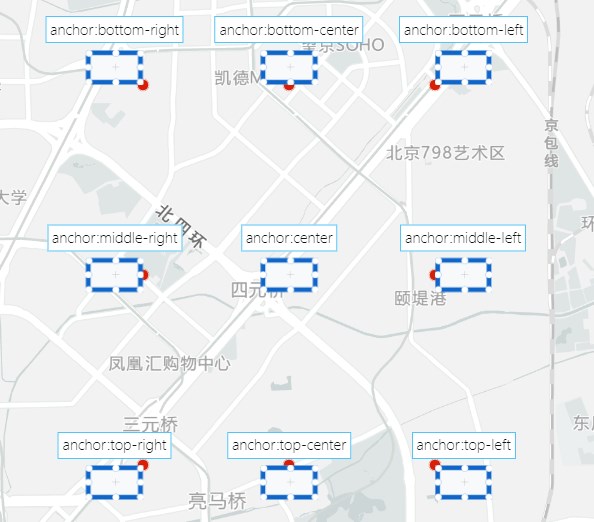
Through anchor, you can conveniently set the anchor position. The optional values for anchor are 'top-left', 'top-center', 'top-right', 'middle-left', 'center', 'middle-right', 'bottom-left', 'bottom-center', 'bottom-right', which respectively represent different orientations of the point marker's anchor. Refer to the figure below, the red dot indicates the actual position of the marker.
const marker = new AMap.Marker({
  icon: "//a.amap.com/jsapi_demos/static/demo-center/marker/marker-bottom-left.png", //Custom Point Marker
  position: [77.19, 28.59], //Base Point Position
  offset: new AMap.Pixel(0, 0), //Set point marker offset
  anchor: "bottom-left", //Set anchor position
});
map.add(marker);
1.2 Set offset
Adjust the offset by setting the offset.
const marker = new AMap.Marker({
  icon: "//a.amap.com/jsapi_demos/static/demo-center/marker/marker-bottom-left.png", //Custom Point Marker
  position: [77.19, 28.59], //Base Point Position
  offset: new AMap.Pixel(0, 0), //Set the point marker offset, the default value is [0,0]
});
map.add(marker);- When the offset is (0, 0) or omitted, the custom content is aligned with the latitude and longitude coordinates by default with the top-left corner as the reference point (if the anchor is set, the reference point set by the anchor is used).
- When the offset is set to other values, the alignment position changes accordingly. The specific offset rules are as follows:
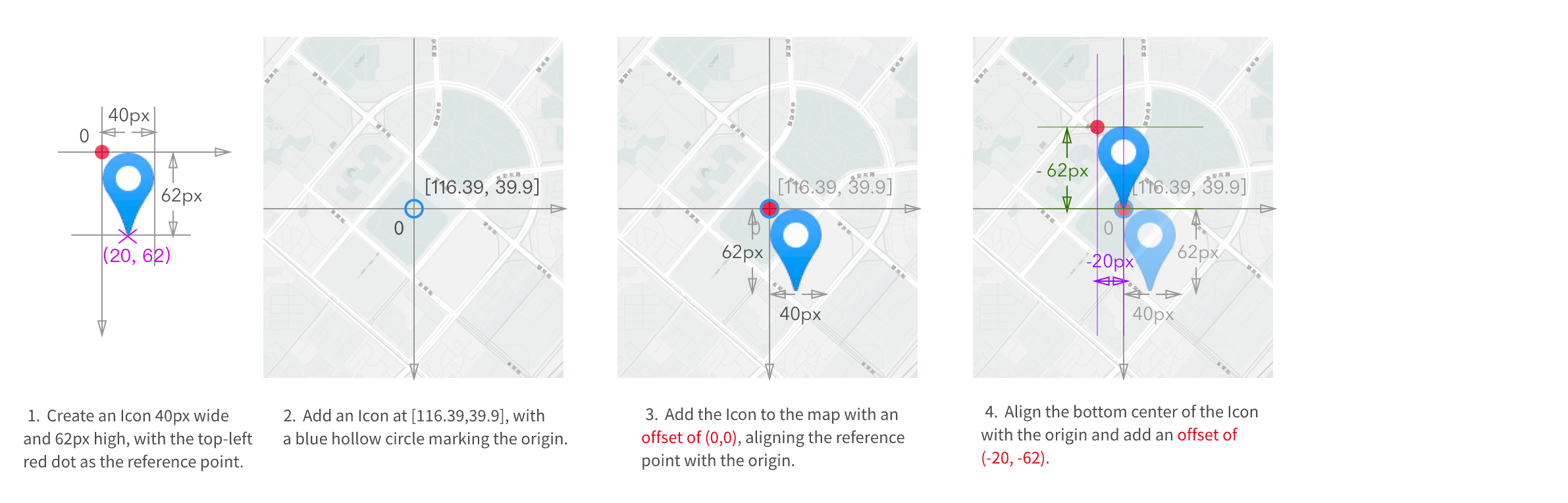
If no anchor is set, the default reference point is the top-left corner 'top-left'. If an anchor is set, the anchor's position will be the reference point.