

Information Window
The information window is an important tool for displaying information in map applications, suitable for scenarios such as location information display. This article introduces the AMap.InfoWindow, including the creation and use of the information window.
Example of default style information window
1、Information Window
A map instance can only open one information window at a time.
1.1 Creation of the default info window
The default info window has a close button, you just need to set the content property of the InfoWindow. The content is a DOM element concatenated by strings, and the style of the content can be customized.
//Content of the info window
var content = [
  "<div><b>高德软件有限公司</b>",
  "电话 : 010-84107000   邮编 : 100102",
  "地址 : 北京市望京阜通东大街方恒国际中心A座16层</div>",
];

//Create an infoWindow instance
var infoWindow = new AMap.InfoWindow({
  content: content.join("<br>"), //Pass in the DOM element concatenated by strings
  anchor: "top-left",
});

//Open information window
infoWindow.open(map, map.getCenter()); //map is the instance of the current map, and map.getCenter() is used to get the coordinates of the map center.1.2 Setup of the anchor of the information window (anchor) (new property since v1.4.13)
The anchor can be used to set the anchor orientation. The optional values of anchor are 'top-left', 'top-center', 'top-right', 'middle-left', 'center', 'middle-right', 'bottom-left', 'bottom-center', 'bottom-right', which represent the different orientations of the information window displayed on the map.
var infoWindow = new AMap.InfoWindow({
  anchor: "top-left",
  content: "This is the information window!",
});

infoWindow.open(map, map.getCenter());1.3 Custom information window
To customize the information window, simply set the isCustom property of InfoWindow to true, and the information window will become a custom information window. The difference from the default information window is that the custom information window needs to implement the close button and all appearance styles through content. At the same time, it is necessary to specify the anchor point position through offset. The offset is the displacement relative to the middle point of the lower edge of content:
//Instantiate the information window
var content = [
  "<div class='info'>This is a custom form",
  "So both the content and style can be customized",
  "<img src='https://webapi.amap.com/images/sharp.png'></div>",
];

var infoWindow = new AMap.InfoWindow({
  isCustom: true, //Use a custom window
  content: content.join("<br>"),
  offset: new AMap.Pixel(16, -45),
});

infoWindow.open(map, map.getCenter());If you want to close the info window, you can use infoWindow.close().
Set style:
.info {
  background-color: #fff;
  text-align: center;
  padding: 10px;
  position: relative;
  border: 1px solid #b9b9b9;
}
.info img {
  width: 30px;
  height: 23px;
  position: absolute;
  left: calc(50% - 15px);
  bottom: -23px;
}Offset of the custom info window
If users customize the content of the info window, they can add an offset to the defined content. When the offset is (0, 0), the custom content is aligned with the latitude and longitude coordinates by default, using the bottom center as the reference point (if an anchor is set, the reference point position is the position set by the anchor). Setting the offset to other values changes the alignment position accordingly. The specific offset rules are as follows:
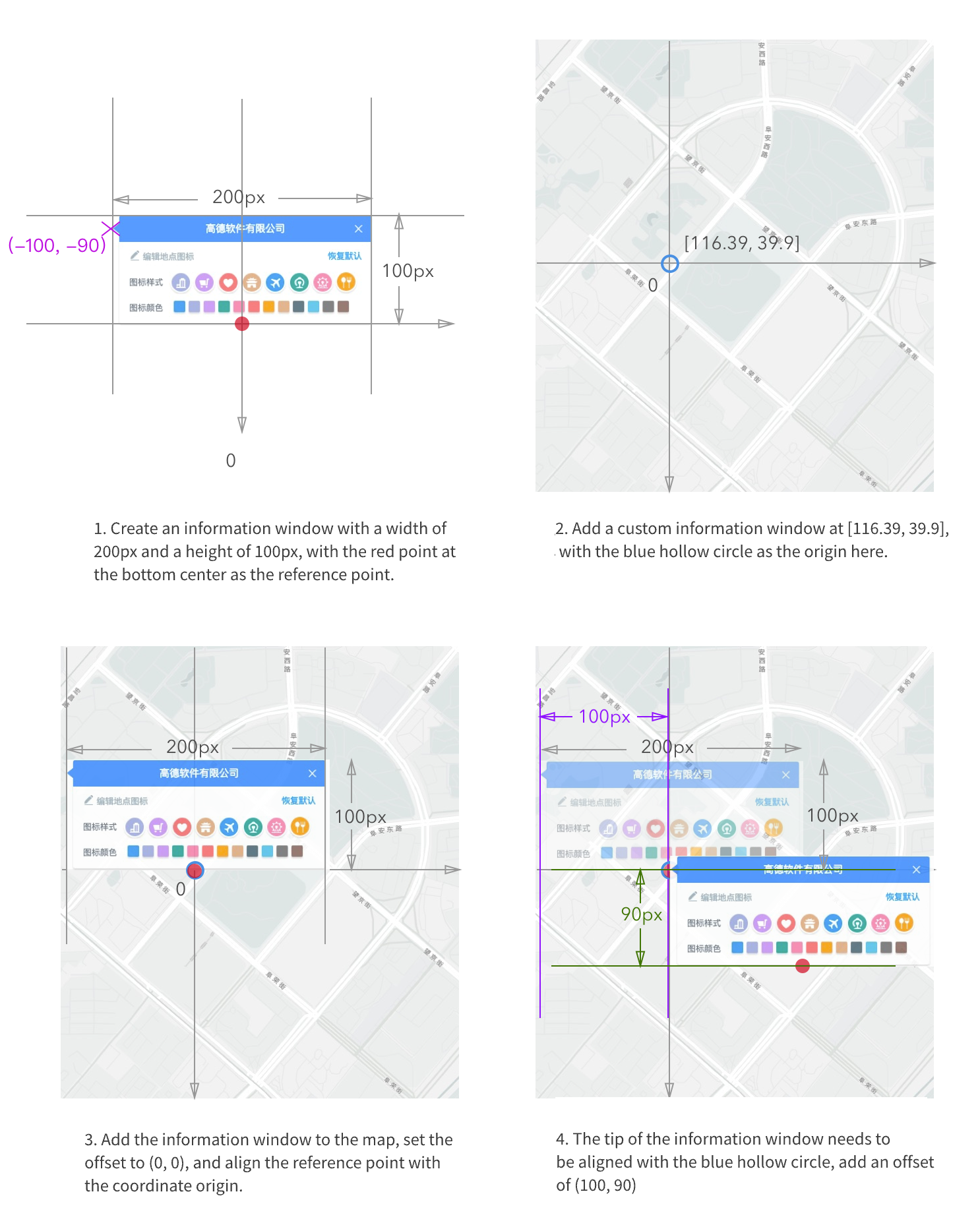
1.4 Events of the info window
The info window supports multiple events, including: the open event (triggered after the info window opens), and the close event (triggered after the info window closes).