
Alternative Routes
Overview
Starting from Navigation SDK v6.3.0, the multi-route navigation mode is supported. In this mode, the real-time navigation interface displays 1 to 2 alternative routes for the user to choose from. Users can switch the guidance route by tapping on a route, with information such as estimated time, distance, and cost differences clearly shown.
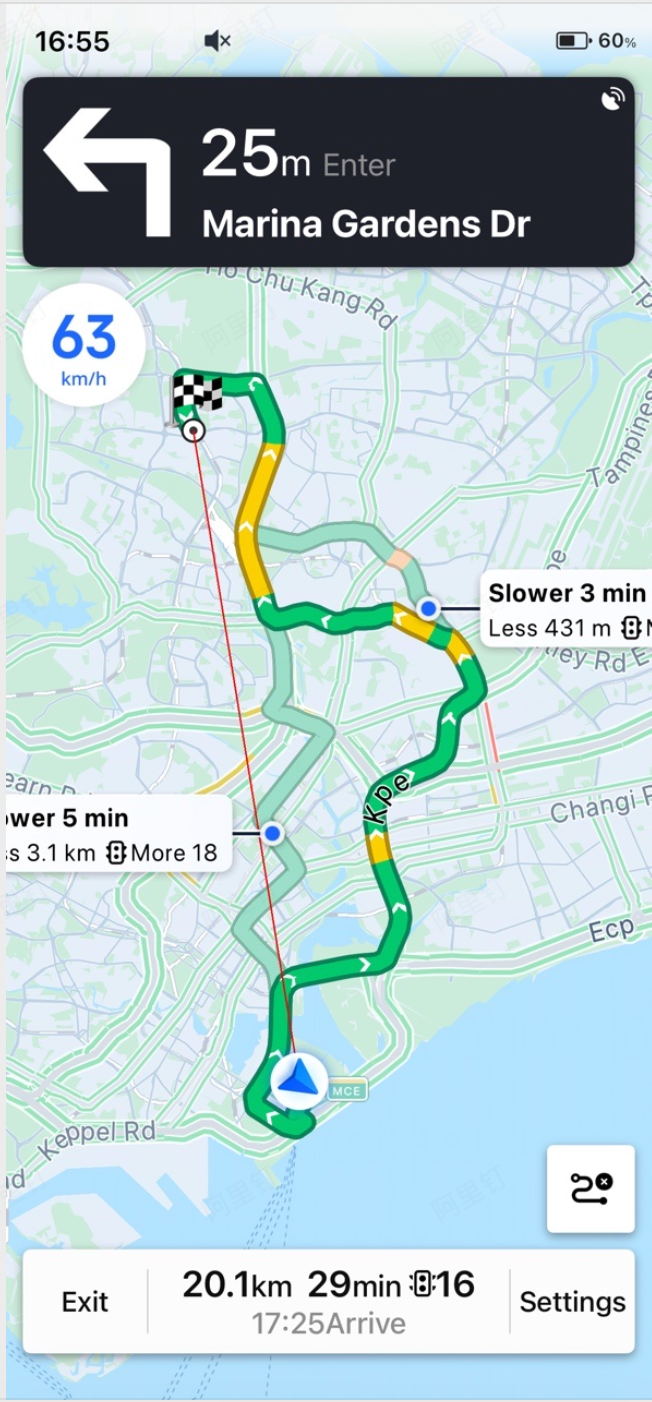
Usage
To enable multi-route navigation mode, call setMultipleRouteNaviMode: before starting route calculation. The following code demonstrates the setup:
[[AMapNaviDriveManager sharedInstance] addDataRepresentative:self];
[[AMapNaviDriveManager sharedInstance] setMultipleRouteNaviMode:YES];
[[AMapNaviDriveManager sharedInstance] calculateDriveRouteWithStartPOIInfo:self.startPOIInfo
                                                                endPOIInfo:self.endPOIInfo
                                                               wayPOIInfos:nil
                                                            drivingStrategy:AMapNaviDrivingStrategyMultipleDefault];
After a successful route calculation, start real-time navigation. When the user switches the guidance route, the following callbacks are triggered:
/**
 * @brief Callback for route information updates
 * @param driveManager The driving navigation manager instance
 * @param naviRoute Route information, see AMapNaviRoute class
 */
- (void)driveManager:(AMapNaviDriveManager *)driveManager
     updateNaviRoute:(nullable AMapNaviRoute *)naviRoute;

/**
 * @brief Callback for alternative route updates in multi-route navigation mode.
 *        Note: This callback is only invoked when multi-route navigation mode is enabled on the driveManager.
 *        Available since v6.3.0.
 * @param driveManager The driving navigation manager instance
 * @param backupRoutes Array of alternative route information, see AMapNaviRoute class
 */
- (void)driveManager:(AMapNaviDriveManager *)driveManager
   updateBackupRoute:(nullable NSArray<AMapNaviRoute *> *)backupRoutes;
Important Notes
* The navigation mode setting takes effect on the next active route calculation. It is recommended to configure this mode immediately after initializing the AMapNaviDriveManager singleton.
* In addition to setting the mode to YES, the following four conditions must all be met for multi-route navigation to work:
* The AMapNaviDrivingStrategy must use a multi-route strategy during route calculation.
* The straight-line distance between the start and end points must be ≤ 80 km.
* No waypoints are allowed.
* Truck types are supported, but multi-route mode consumes truck route calculation service quotas.