

Walking Routing
This guide describes how to use the Map SDK's search functionality to plan a walking route. You must import the search library (AMapSearchKit.framework into your project.
Walking route planning is typically used for distance estimation on shorter trips. The current maximum supported walking distance is 100 km.
Before You Begin
Before you start, make sure you have completed the following steps:
1. Import the required header files.
2. Configure your API key.
3. Define and construct the AMapSearchAPI object.
Step 1: Import Header Files
Import the AMapFoundationKit.h and AMapSearchKit.h header files.
#import <AMapFoundationKit/AMapFoundationKit.h>
#import <AMapSearchKit/AMapSearchKit.h>
Step 2: Configure Your API Key
You must add your API key before using the search functionality.
For AMapSearchKit v4.x:
Set the key using the AMapServices class.
[AMapServices sharedServices].apiKey = @"Your API Key";For AMapSearchKit v3.x or earlier:
We strongly recommend updating to the latest version. If you are using v3.x, set the key as follows:
[AMapSearchServices sharedServices].apiKey = @"Your API Key";Step 3: Define AMapSearchAPI
Declare a property for the main search object, AMapSearchAPI, and adopt the AMapSearchDelegate protocol.
Step 4: Construct AMapSearchAPI
Initialize the AMapSearchAPI object and set its delegate.
self.search = [[AMapSearchAPI alloc] init];
self.search.delegate = self;
Step 5: Set Walking Route Parameters
The request class for walking route planning is AMapWalkingRouteSearchRequest. The origin (starting point) and destination (endpoint) parameters are required.
self.startAnnotation.coordinate = self.startCoordinate;
self.destinationAnnotation.coordinate = self.destinationCoordinate;

AMapWalkingRouteSearchRequest *navi = [[AMapWalkingRouteSearchRequest alloc] init];

/* Starting point. */
navi.origin = [AMapGeoPoint locationWithLatitude:self.startCoordinate.latitude
                                       longitude:self.startCoordinate.longitude];
/* Destination. */
navi.destination = [AMapGeoPoint locationWithLatitude:self.destinationCoordinate.latitude
                                            longitude:self.destinationCoordinate.longitude];
Request Parameters
Step 6: Initiate the Route Request
Call the AMapWalkingRouteSearch method on your AMapSearchAPI instance to start the walking route search.
[self.search AMapWalkingRouteSearch:navi];Step 7: Handle the Response
On a successful search, the onRouteSearchDone callback is triggered. Parse the AMapRouteSearchResponse object to retrieve the walking route data and display it on the map.
Notes:
* Parse the response object in the callback to obtain the walking path.
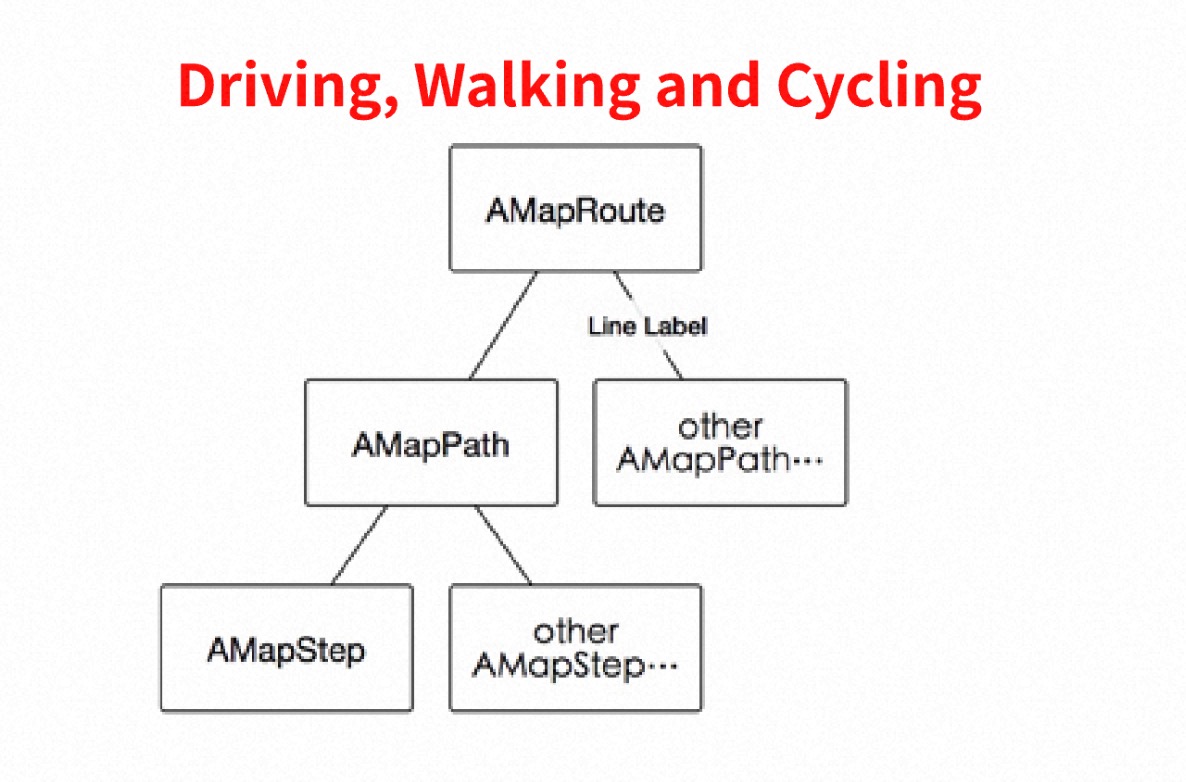
* The response.route.paths property returns a list of AMapPath objects. For detailed information about the walking plan, refer to the AMapPath class.
* The structure of the route planning result is shown in the diagram below. Use this structure to parse the result and display the route accurately.
- (void)onRouteSearchDone:(AMapRouteSearchBaseRequest *)request response:(AMapRouteSearchResponse *)response {
    if (response.route == nil) {
        return;
    }
   // Parse the response to extract path information; see the Demo for details.
}
Response Parameters
Handle Errors
If the search fails, the didFailWithError callback is triggered. Use this callback to retrieve the reason for the failure.
- (void)AMapSearchRequest:(id)request didFailWithError:(NSError *)error {
    NSLog(@"Error: %@", error);
}