

Offline Maps
The 3D Map SDK supports offline maps. (The 2D Map SDK does not support this feature.)
Offline maps allow you to view map information without a network connection. When offline map data is available on the device, the SDK loads the offline data first.
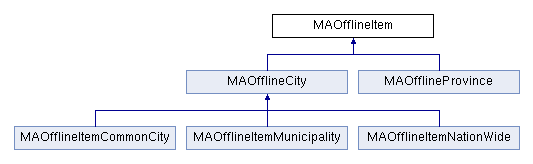
The offline data item, MAOfflineItem, contains basic information about an offline map data package, including the city code, city name, and data status. It serves as the base class for province-level offline data (MAOfflineProvince) and city-level offline data (MAOfflineCity). MAOfflineCity further derives three subclasses: the national overview map (MAOfflineItemNationWide), municipalities (MAOfflineItemMunicipality), and common cities (MAOfflineItemCommonCity).
The relationship between these classes is shown in the following diagram. For more details, see the reference manual.
Offline Map UI Component (Recommended)
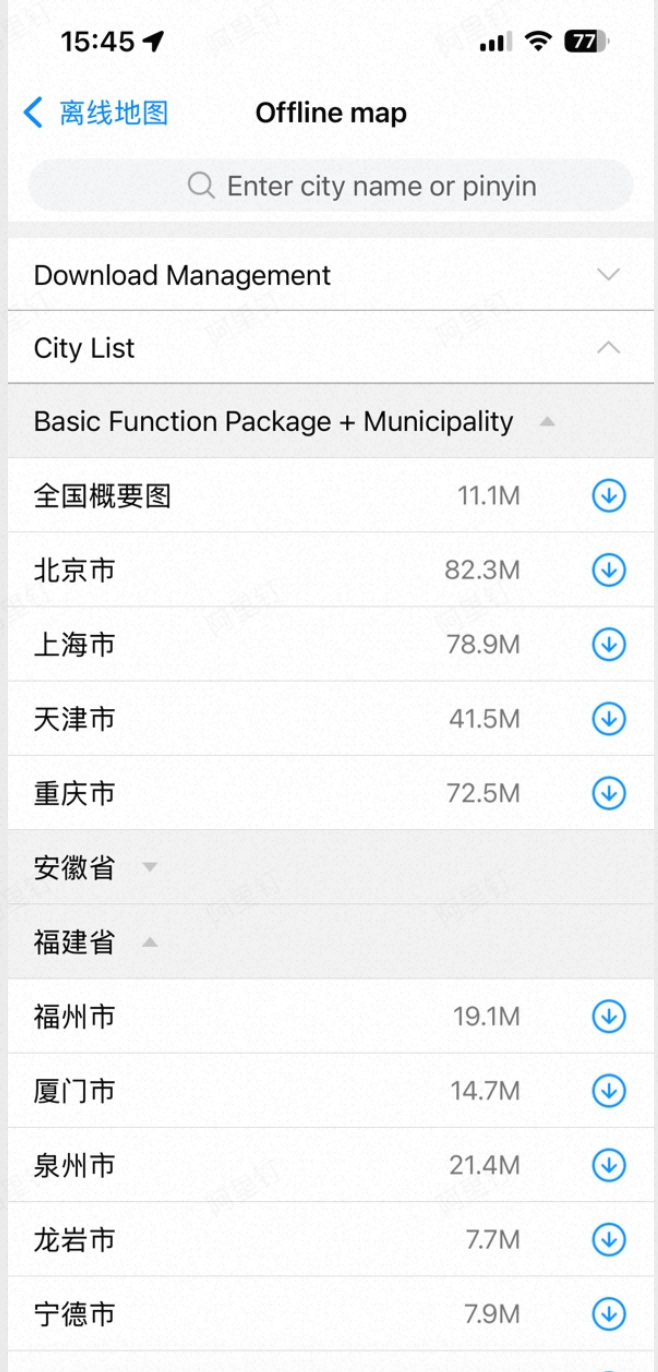
Starting with 3D Map SDK v5.7.0, an offline map UI component is available. This component provides features such as city download, pause, update, deletion, and keyword-based city search. It is a subset of the offline map functionality found in the AMAP app. The UI interaction style is consistent with the AMAP app, while remaining simple and minimal to integrate seamlessly with your application's UI.
The following code demonstrates how to implement offline map functionality with a single call:
UIViewController *detailViewController = [MAOfflineMapViewController sharedInstance];
[self.navigationController pushViewController:detailViewController animated:YES];
UI Preview
Custom Offline Maps
Start a Download
The following example shows how to download an offline data item:
[[MAOfflineMap sharedOfflineMap] downloadItem:item shouldContinueWhenAppEntersBackground:YES downloadBlock:^(MAOfflineMapDownloadStatus downloadStatus, id info) {
    // UI updates must be performed on the main thread.
}];
Parse Offline Map Data
The following example shows how to parse offline data items:
self.cities = [MAOfflineMap sharedOfflineMap].cities;          // Common cities and municipalities
self.provinces = [MAOfflineMap sharedOfflineMap].provinces;    // Provinces
self.municipalities = [MAOfflineMap sharedOfflineMap].municipalities; // Municipalities
Pause a Download
The following example shows how to pause a download:
[[MAOfflineMap sharedOfflineMap] pauseItem:item];Cancel All Downloads
The following method cancels all offline map downloads:
[[MAOfflineMap sharedOfflineMap] cancelAll];Check for Updates
The following code checks whether the offline map data has a newer version. This operation also updates the local offline map configuration file to the latest version, allowing users to download the latest offline map data based on the updated configuration.
[[MAOfflineMap sharedOfflineMap] checkNewestVersion:^(BOOL hasNewestVersion) {
    if (!hasNewestVersion) {
        return;
    }
    // Handle the update.
}];
Delete Offline Maps
Delete a Single Item
[[MAOfflineMap sharedOfflineMap] deleteItem:item];Delete All Items
/**
 *  Clears all offline map data stored on disk.
 *  Call [mapView reloadMap] afterward to apply the changes immediately.
 */
- (void)clearDisk;