
Alternative Routes
Overview
Starting from Navigation SDK v6.3.0, the multi-route navigation mode is supported. In this mode, the real-time navigation interface displays 1 to 2 alternative routes for the user to choose from. Users can view information such as estimated time difference, distance difference, and toll difference, and tap a route to switch the guidance route.
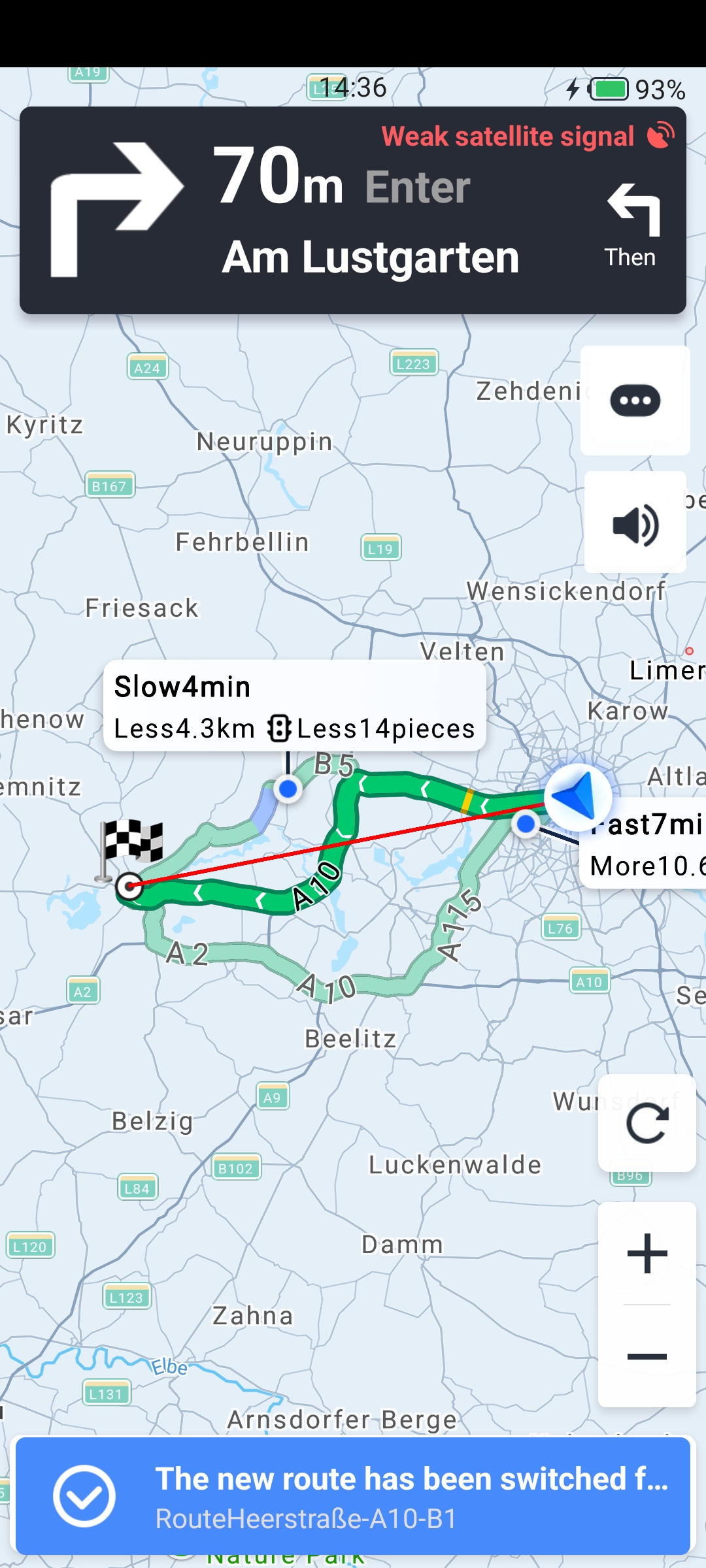
Enable Multi-Route Navigation
To enable multi-route navigation mode, call AMapNavi.setMultipleRouteNaviMode() before starting route calculation. The following code example demonstrates this:
// Enable multiple route mode
mAMapNavi.setMultipleRouteNaviMode(true);

// Starting point
NaviPoi start = new NaviPoi("Berlin", new LatLng(52.51905, 13.40105), "");

// Ending point
NaviPoi end = new NaviPoi("Brandenburg an der Havel)", new LatLng(452.4167, 12.5500), "");

// Enable multiple route mode and calculate driving route
boolean isSuccess = mAMapNavi.calculateDriveRoute(start, end, null,
        PathPlanningStrategy.DRIVING_MULTIPLE_ROUTES_DEFAULT);
Handle Route Updates
When multi-route navigation mode is enabled, the SDK periodically calculates alternative routes during navigation. When new alternative routes are available, the route calculation success callback is triggered. You can then switch routes using the AMapNavi interface.
@Override
public void onCalculateRouteSuccess(AMapCalcRouteResult routeResult) {
    // Check if the calculation type is an alternative route update
    if (routeResult.getCalcRouteType() == ReCalculateRouteType.ROUTE_TYPE_MUTIROUTE_REQUEST) {
        // Handle alternative route update
    }
}

// Retrieve the collection of available routes
HashMap<Integer, AMapNaviPath> hashMap = mAMapNavi.getNaviPaths();

// Switch to a specific route using its path ID
mAMapNavi.selectMainPathID(hashMap.get(12).getPathid());
Important Notes
- The navigation mode setting takes effect on the next active route calculation. It is recommended to configure this setting immediately after initializing the AMapNavi singleton.
- In addition to setting the multi-route mode to true, the following conditions must all be met for multi-route navigation to work:
- The route planning strategy (AMapNaviDrivingStrategy) must use a multi-route strategy.
- The straight-line distance between the start point and destination must be ≤ 80 km.
- No waypoints can be set.