
Android 6.0 Permissions
Android 6.0 (API level 23) introduced a new runtime permission model that requires apps to request certain permissions, including location permissions, at runtime rather than only at install time. This document explains how to handle location permissions for apps targeting Android 6.0 and above.
Before You Begin
If your app's targetSdkVersion is set to 22 or lower, Android 6.0 automatically grants all permissions declared in the manifest at install time. In this case, your app will not crash due to missing runtime permissions. However, to support Android 6.0 and later, you should update your target SDK version and implement runtime permission requests.
Step 1: Declare the Target SDK Version
Set your app's targetSdkVersion to 23 (or higher) to enable the runtime permission model.
Android Studio:
In your build.gradle file, declare targetSdkVersion 23:
android {
    compileSdkVersion 23
    buildToolsVersion '23.0.1'

    defaultConfig {
        applicationId "com.amap.location.demo"
        minSdkVersion 14
        targetSdkVersion 23
        versionCode 1
        versionName "2.5.0"
    }
    buildTypes {
        release {
            minifyEnabled false
            proguardFiles getDefaultProguardFile('proguard-android.txt'), 'proguard-rules.pro'
        }
    }
}
Eclipse:
In your AndroidManifest.xml file, declare targetSdkVersion 23:
<uses-sdk android:minsdkversion="14" android:targetsdkversion="23"></uses-sdk>Step 2: Check and Request Location Permissions
Before performing any location operations, check whether the required permissions have been granted. If not, request them from the user.
The following location permissions require runtime checking on Android 6.0:
- Manifest.permission.ACCESS_COARSE_LOCATION
- Manifest.permission.ACCESS_FINE_LOCATION
The example below demonstrates how to check and request ACCESS_COARSE_LOCATION. For a complete implementation, refer to the CheckPermissionsActivity.java file in the sample demo.
// Check if the permission is already granted
if (ContextCompat.checkSelfPermission(this, Manifest.permission.ACCESS_COARSE_LOCATION)
        != PackageManager.PERMISSION_GRANTED) {
    // Request the permission
    ActivityCompat.requestPermissions(this,
            new String[]{Manifest.permission.ACCESS_COARSE_LOCATION},
            WRITE_COARSE_LOCATION_REQUEST_CODE); // Custom request code
}
Step 3: User Grants Permission
After calling requestPermissions(), the system displays a dialog asking the user to grant or deny the permission.
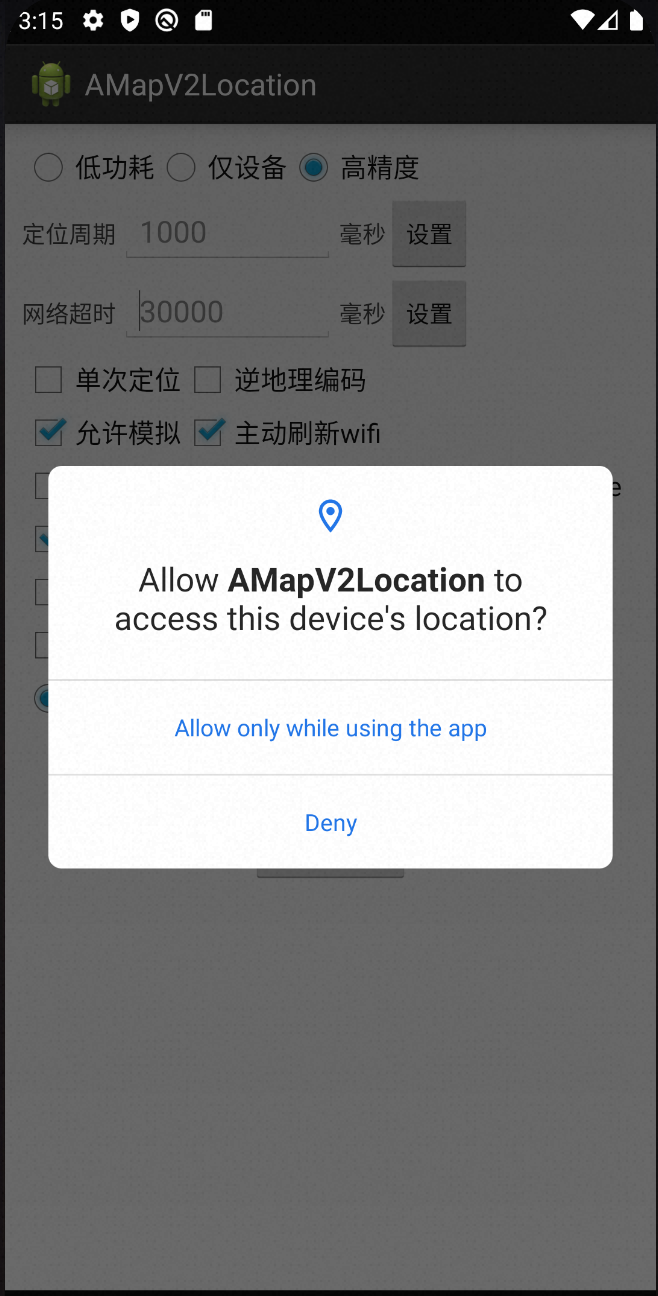
Step 4: Handle the Permission Result
When the user grants or denies the permission request, the system calls the onRequestPermissionsResult() callback method. This method works similarly to onActivityResult().
@Override
public void onRequestPermissionsResult(int requestCode, String[] permissions, int[] grantResults) {
    super.onRequestPermissionsResult(requestCode, permissions, grantResults);
    // Continue with your logic here
}